Jalan.net: Booking Site for Hotels & Ryokans in Japan
Jalan.net: One of the largest online hotels & ryokans booking site in Japan
View and Cancel My Reservation
International Sites :Japan
Jalan.net is a travel information website operated and managed by Recruit Co., Ltd., through which it is also possible to make accommodation reservations.In addition to the simple online booking of accommodation plans, day return and day-use plans offered by over 20,000 participating establishments, Jalan.net is also packed with everything to do with travel in general, such as package tours offered by travel agencies, information on 90,000 tourist attractions and events around the country, and exciting photos and reviews of destinations from members of the site. We hope you will use Jalan.net for your travel, business trip and accommodation needs.
The following Jalan.net membership privileges cannot be used on this site.
- Earning points
- Redeeming points
- Posting reviews
- Modifying reservations (cancellations are possible)
- Making reservations more than 3 months in advance
* You need to use your current information to make reservations (name, address and etc.)
|
We recommend the following environments for usage of Jalan.net. Please be advised that functions may not work properly when using an environment other than the ones listed below.
However, the display setting for the browser must be 100% in any case. *Due to changes in Microsoft's support and policies, Microsoft Internet Explorer Ver.11 are not included in the list of recommended environments for Jalan.net. Although we have confirmed that usage is possible without any issues as of June 2022, we cannot guarantee proper functionality after this point. From a security perspective, we ask that you please switch to the latest version of Microsoft Edge or Google Chrome. |
|

- (1) [Search] home page, search functions and feature articles
- (2) [Compare] how to read and use search results
- (3) [Consider] how to view the details of establishments and accommodation plans
- (4) [Registration] entering customer information
- (5) [Completion of reservation]
 |
If you've already decided the dates and destination of your trip, please use quick search. You will be directed to a list of accommodation facilities.
When you click on an area of interest, you will be able to select from the most popular prefectures and regions. When you select the region you want to visit, you will be directed to a list of accommodation facilities. If you select a prefecture that you want to visit, the map will change to the prefectural map, from which you can click a region that you wish to visit. |
 Quick search
 Map search
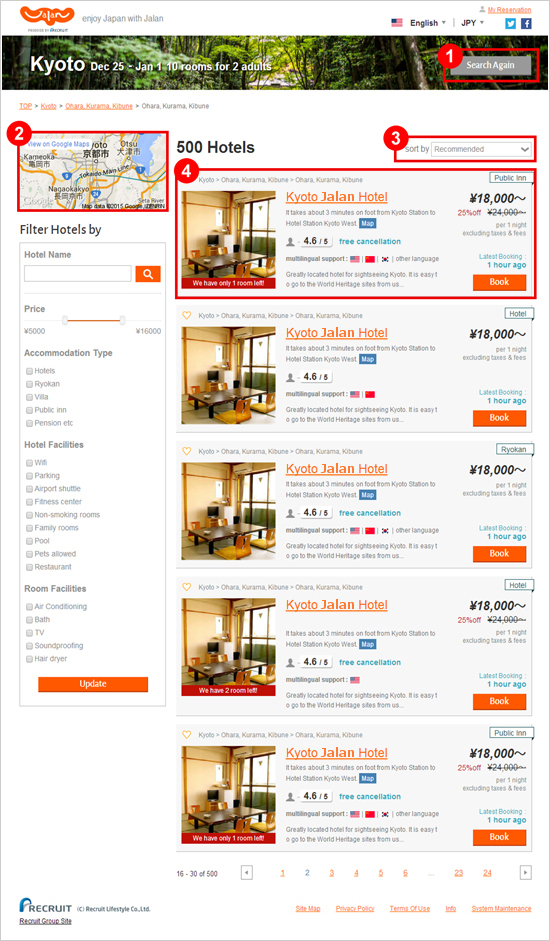 |
You can search again with different criteria, such as the destination or date. The criteria that can be changed vary depending on the search menu, but in general, you can search again with changes to the following criteria: Check-in date, number of rooms, number of adults and number of children.
You can switch the display of search results from a list view to a map view. In the map view, you can check the location of hotels and ryokans. In the list view of search results, you will find a summary of each hotel.
You can freely sort the search results.
The hotel name, hotel photo, directions, accommodation plans and multilingual support are displayed in the search results. To check the details of an accommodation facility, click on its name or the "book" button.
You can filter search results based on the following criteria: hotel name, budget, accommodation type, room type and hotel facilities. |
 Sort by
 Search results
 Filter search results
 |
You can view a variety of photos of the hotel.
You can view the main highlights of the hotel in list form.
You can check details such as your selected plan and advisory notes, room type, facilities, check in/out times and meals.
Click to proceed with this booking.
You can check detailed information on the hotel. |
 |
Check the check-in date, length of stay, number of rooms and number of guests, then enter the time you will check in.
Enter your name, address and phone number (including country code).
Enter your email address and press the send button, a verification email will be sent, so please check your inbox. Please enter the 4-digit code written in the email you receive.
Deposit rates, cancellation policies and special advisory notes vary by accommodation facility and plan, so please check these thoroughly before clicking the "next" button. |
 |
When you have finished entering guest information, click on the "next" button to proceed to the final confirmation page. At this stage, your reservation is not yet complete. Confirm the details of the reservation, the terms of use and the privacy policy, then click "I agree, reserve". After you click the button, your reservation number will be displayed on the reservation complete page. This means that you have entered into an accommodation agreement with your chosen accommodation facility. Please click the "confirm reservation" button on the reservation complete page. We recommend you print out the details of the reservation, and bring this with you to the accommodation facility. You will receive an email from us so that you can confirm the details of your reservation in your account. Please check the details of the reservation carefully. It is not possible to modify the reservation after booking is complete. If you want to change the reservation, please cancel the current reservation and re-book. |
When you make a reservation concerning the use of a room (for day return and day-use plans, this is not necessarily a guest room) online through Jalan.net, once the reservation number is displayed, an accommodation agreement (usage agreement) is established between you and your chosen establishment. Jalan.net will notify the establishment of your reservation information within 24 hours. Details of the reservation can be confirmed from the "display / modify / cancel reservation" page.
About payment
Payment will be taken at the accommodation facility. We recommend you bring a copy of the booking confirmation email or reservation status reference page in order to avoid misunderstanding at the time of payment.
About contacting the accommodation facility after reservation
If you wish to contact the accommodation facility directly, such as to make an additional order after reservation, then please use the telephone number that can be found on the reservation confirmation email to contact them directly. Similarly, for enquiries concerning deposits and cancellation fees, once the reservation has been made, please telephone the accommodation facility. However, if you contact immediately after making the reservation, it may take the establishment some time to confirm the details of your reservation information. In this case, it can make things easier if you state that you made the reservation through Jalan.net, and approximately what time it was made.
About cancellation
If you must unfortunately cancel your reservation due to unavoidable circumstances, please follow the cancellation procedure. The cancellation procedure differs according to when you cancel.
(1) If still within the period during which online modification is possible, as stated on the details
confirmation page:
If this period has not passed, you can cancel the reservation from this page. Follow the procedure from the "display / modify / cancel reservation" page.
(2) If the period during which online modification is possible has passed:
If this period has passed, cancellation is not possible from this page, so please carry out the cancellation procedure with the accommodation facility by telephone, using the phone number that can be found on the reservation confirmation email. When cancelling by telephone, please tell the facility the reservation number from the confirmation email, to help the process go smoothly.
Cautions about cancellation
Depending when you cancel, you may be liable to pay a cancellation fee. Regarding the period when cancellation fees are applicable, please refer to the reservation confirmation email or details confirmation page.
In the case that you cancel within the period when a cancellation fee is applicable, you may receive an email directly from the accommodation facility demanding payment of the cancellation fee.
If you have paid a reservation deposit, you may find that some or all of the already paid deposit is appropriated as the cancellation fee.
Even if you have paid a deposit, if the deposit you paid is less than the cancellation fee set out in the cancellation policy, you may receive an additional bill for the cancellation fee from the accommodation facility.
Please note that once a reservation is cancelled, it cannot be reinstated without remaking the booking from scratch.
The requirement and amount of booking deposits vary according to accommodation facility. Please check the details confirmation page or reservation confirmation email for more information.
If a booking deposit is required
For establishments that state a booking deposit is required on the details confirmation page or in the reservation confirmation email, you must pay the deposit by bank transfer or other means within the indicated period Please pay the deposit by the specified method within the specified period, which starts from the date of reservation stated on the details confirmation page or reservation confirmation email .
Cautions about booking deposits
If you do not pay the deposit by the specified date, you may be contacted by the accommodation facility directly, demanding payment. If you do not pay despite being requested, your reservation may be cancelled, so please be careful. However, even in the case that the deposit was not paid, the reservation will never be cancelled without notification from the accommodation facility. If you want to cancel your reservation, make sure to either cancel online or by contacting the accommodation facility. If cancelling, any deposit paid may be appropriated as some or all of the cancellation fee.
Regarding payment confirmation emails, we are not able to get immediate confirmation from some
accommodation facilities, due to the nature of their accounting or local financial institutions. We recommend you either wait a week, or contact the facility directly.